Ivory, gold and filigree
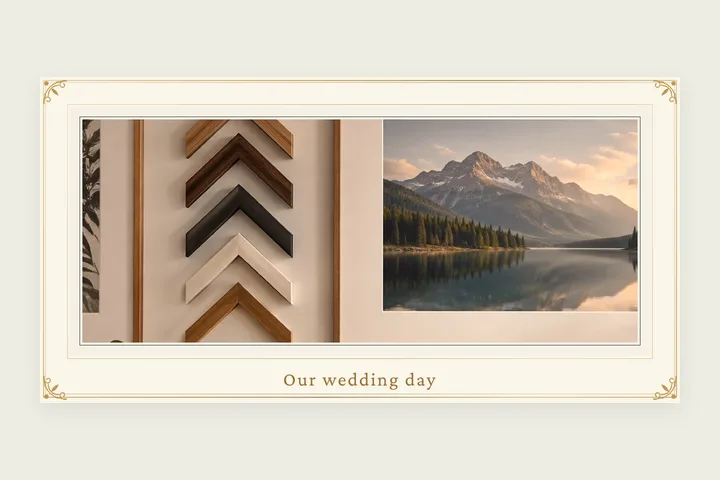
This page opens the studio on the Wedding style from the Occasions family: an ivory band round the photo, a gold double rule near its outside edge, a fine gold hairline where it meets the picture, and a filigree motif in each corner — curling stems, a leaf and a small rosette, mirrored so all four corners match. The bottom edge is 1.6 times the sides and carries a caption, which starts as “Our wedding day” in a serif face; most people replace it with the two names and the date.
The gold is drawn as a gradient running from pale to deep and back, so it reads as foil rather than flat yellow. Corner motif chooses how ornate the corners are, from none through a plain bracket and a flourish to the full filigree. For a gilded wooden-moulding look rather than a printed mat, the gold frame page draws a carved moulding with the same corner motifs.
Framing a wedding photo
- 1Open the photo. It is set in ivory with gold rules and filigree corners.
- 2Type the names and date under Caption; choose a face.
- 3Adjust the width, the bottom weight and the corner motif.
- 4Save at full size for a print or an album page.
Limits worth seeing before export
- The foil is a drawn gradient. It looks like gold on screen and in a print, but an ordinary printer cannot print metallic ink.
- Long captions need room: the bottom weight control makes the bottom edge deeper.
Questions about the rendered frame
Can I add our names and the date?
Yes. The frame opens with a caption along its deeper bottom edge. Type the names, the date or both into Caption under Border, and pick the serif, handwritten, sans or typewriter face. The colour is a slot like any other.
Is the gold real foil?
It is drawn as metal: the rules are a gradient of light and dark gold so they read as foil on screen and in a print. It will not print as metallic ink on an ordinary printer — nothing on screen can.
Does it work for an anniversary photo?
Yes. It is the same frame; change the caption. For a heavier, more formal look, use the gold frame page, which draws a full carved moulding.
Can I change the ivory?
Yes. The mat colour and the gold are both colour slots, and Match photo suggests colours from the picture. Corner motif sets the corners from none to the full filigree.
Other frame families
- Gold photo frameA carved gold, silver, lacquer or wood moulding with mitred corners and corner motifs.
- Photo matA gallery mat with a bevelled cut, weighted bottom, V-groove or double mat, in millimetres.
- Photos in one frameTwo, three or four photos in one mat with bevelled openings, a moulding and a caption.